We built a team dashboard for a 12-person cleaning company: jobs, rota and checklists
By Matthew, Developer · · 5 min read
In short: From one paragraph, TypeAnApp built a staff-only operations board for a cleaning company: an overview, a job board, a weekly rota, checklists per type of clean and a team list, where cleaners only see their own jobs. It took three messages, about nine minutes and 33.5 build credits. Brightside Cleaning Co. is an example business we made for this case study.
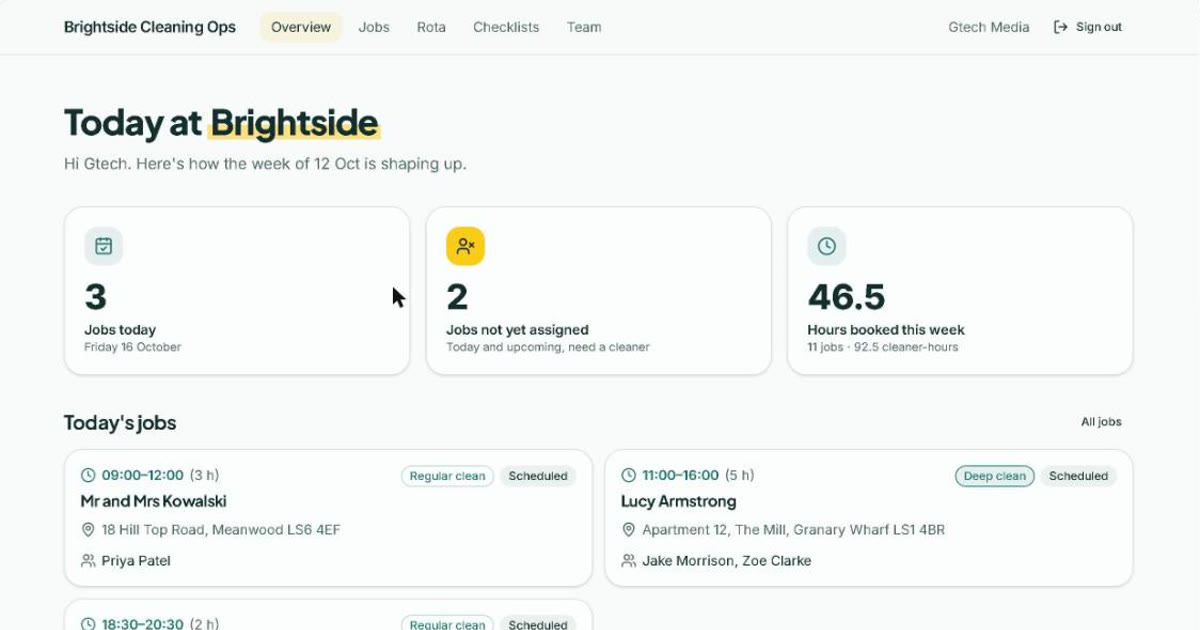
Brightside Cleaning Co. is an example business we built to show what TypeAnApp can do. Visit the live site.
A lot of small businesses don't need a website first. They need the thing behind it: who is working on Thursday, which jobs still have nobody on them, and whether the end-of-tenancy checklist actually got done. So for the last of our six showcase builds we asked TypeAnApp for an internal tool, an operations board for a cleaning company with about a dozen staff.
Facts at a glance
- Time to build
- About 9 minutes
- Build credits
- 33.5
- Messages sent
- 3
- Pages
- Overview, jobs, job detail, rota, checklists, team
- Tables
- 5
- Who can sign in
- Staff only
What did we ask for?
What we typed
An operations dashboard for Brightside Cleaning Co., a cleaning company with about 12 staff. Team only: staff sign in. A job board of today's and upcoming jobs (client address, type: regular clean, deep clean, end of tenancy; assigned cleaners; status), a weekly staff rota, a checklist for each job type, and an overview showing jobs today, jobs not yet assigned and hours booked this week. Managers create and assign jobs; cleaners see only their own jobs and tick off the checklist.
Two kinds of people, two different views of the same data. That is where internal tools usually get fiddly, so it was the part we watched most closely.
What came back from the first build?
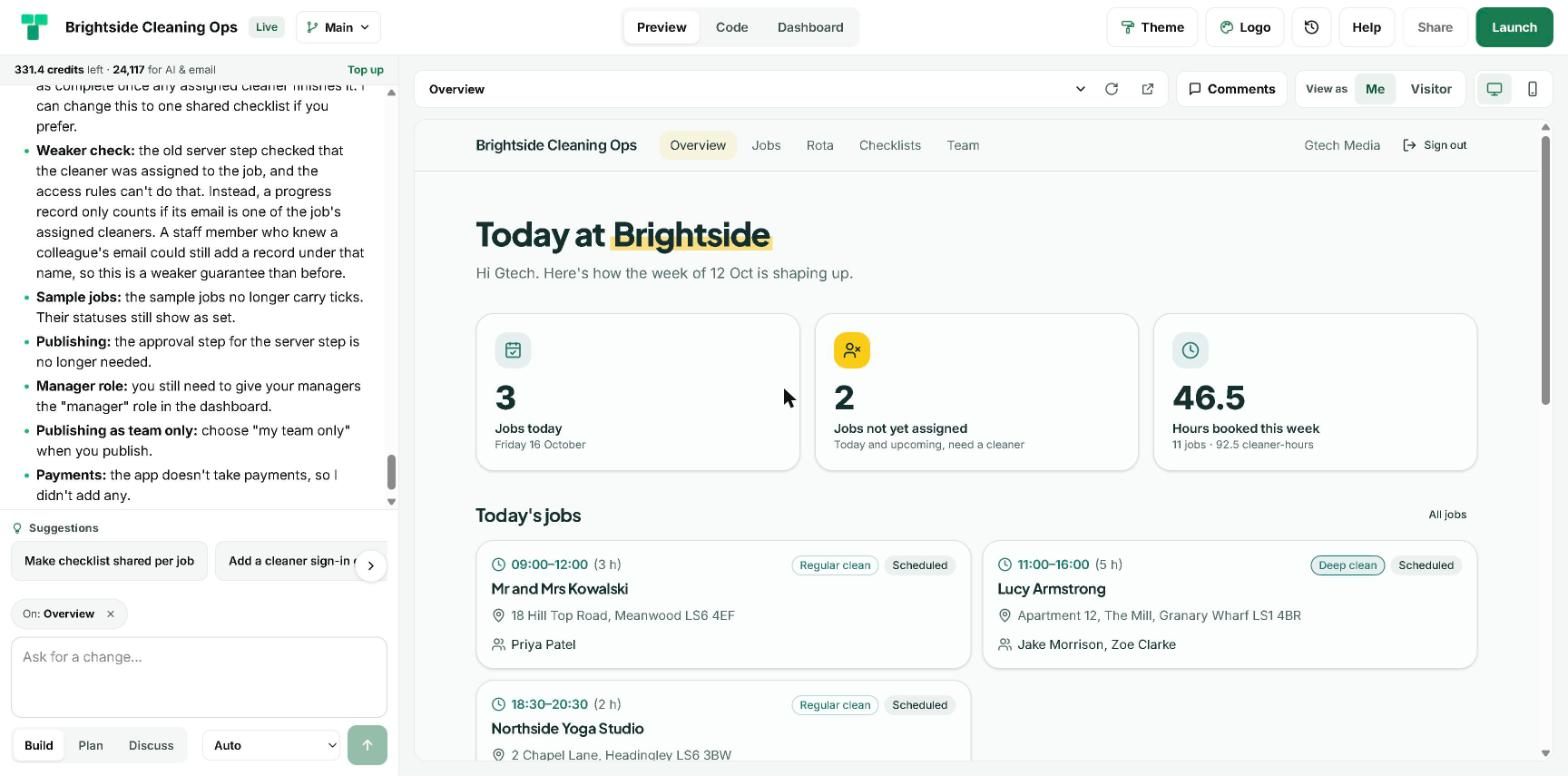
The first build took 5 minutes and used 19 build credits. It produced six pages and enough sample data to see the thing working straight away: 12 team members, 24 checklist tasks, 17 jobs (two deliberately with no cleaner yet) and a week of shifts.
- Overview: jobs today, jobs not yet assigned and hours booked this week. Cleaners see their own numbers.
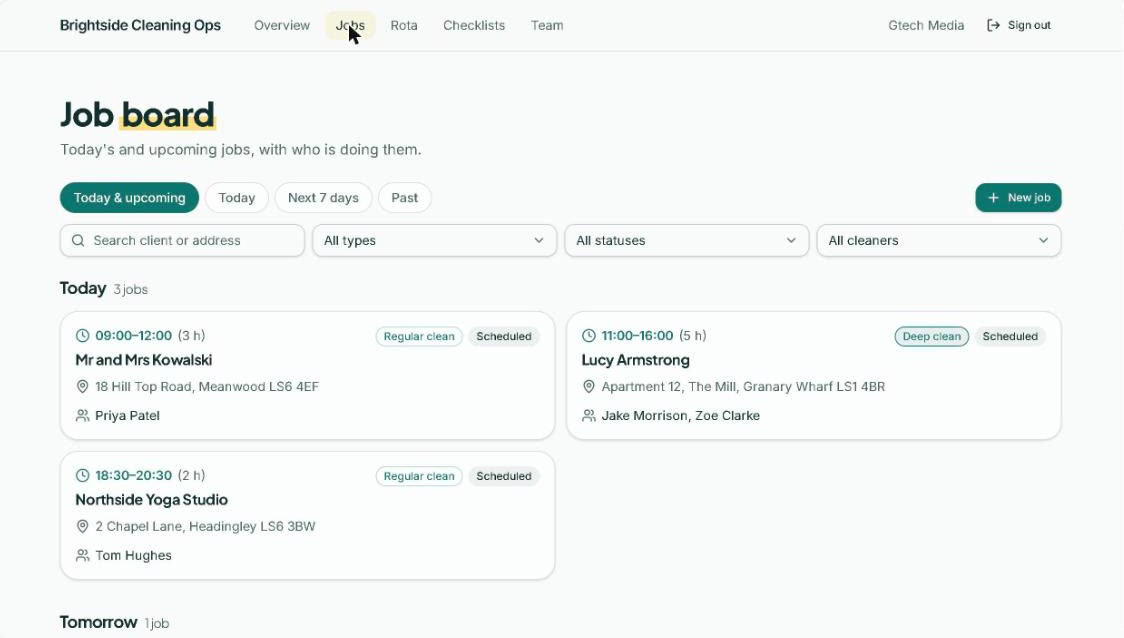
- Job board: today, the next seven days and past jobs, with filters for type, status and cleaner, and a search by client or address.
- Job details: address, client phone, notes and assigned cleaners. A cleaner can start the job, tick the checklist and mark it complete.
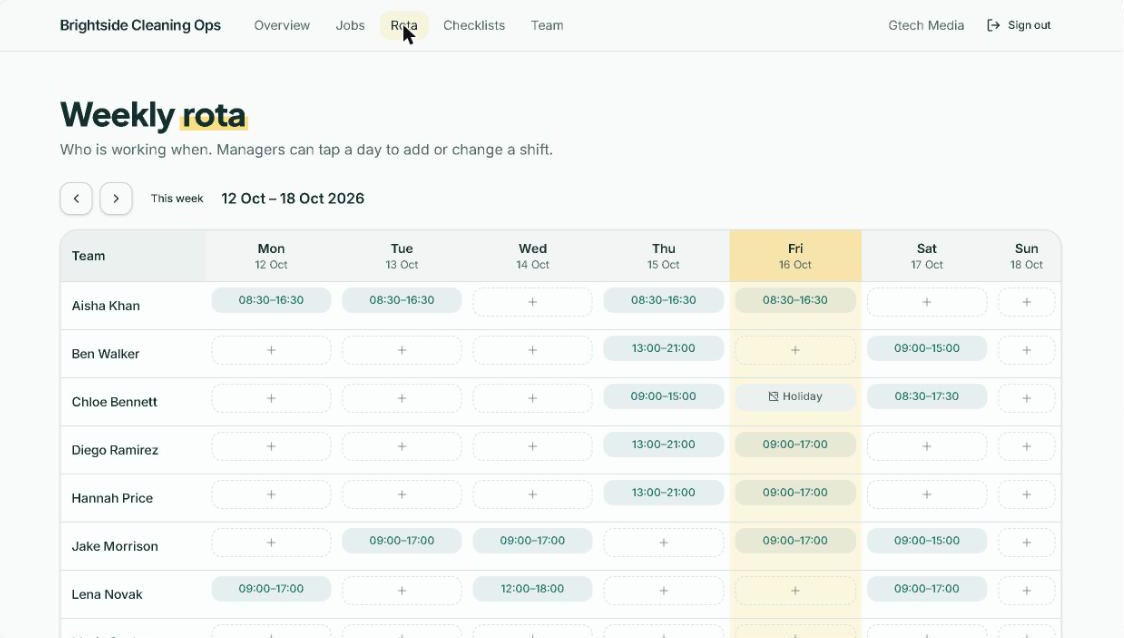
- Weekly rota: a staff-by-day grid with holidays shown. Managers tap a cell to add or change a shift.
- Checklists: one list per type of clean, which managers can reorder.
- Team: the staff list, which managers can edit.
Who can see what?
This is the heart of the build. The rules live on the server and apply to every request, so a cleaner who guessed a web address still could not read somebody else's jobs.
- Cleaners see only the jobs they are assigned to, and only they can tick their own progress.
- Managers see every job and are the only people who can create, edit or delete jobs, shifts, checklists and team members.
- All signed-in staff can see the rota, the team list and the checklists.
- The public sees a sign-in screen and nothing else.
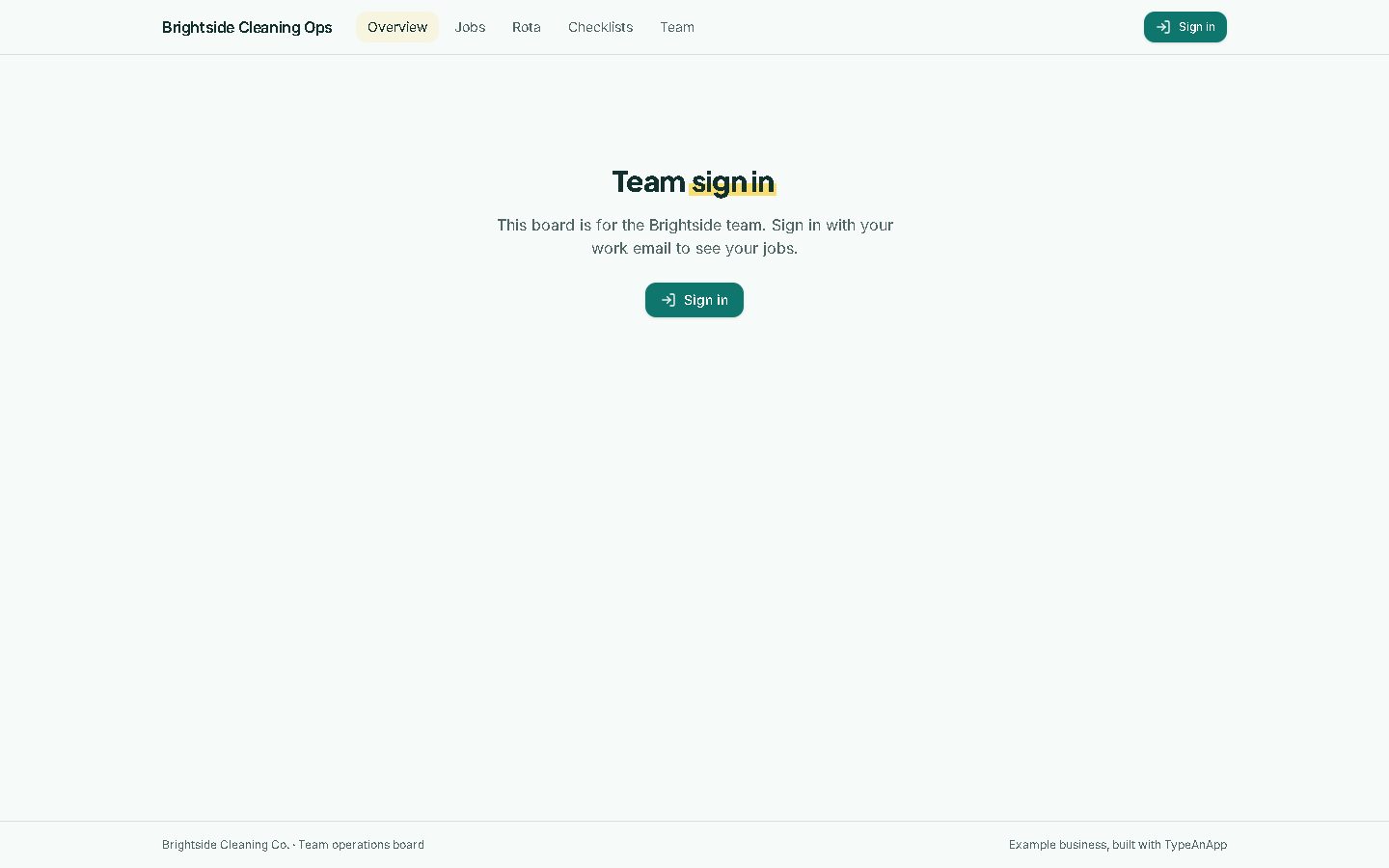
One honest note. We launched this example publicly so you can visit the address and see the sign-in screen. For a real company the builder recommended choosing "my team only" at launch, which adds an invite list on top of the rules. We agree, and it is one setting.
What went wrong, and how did we fix it?
Two things, both worth telling because they are the sort of thing you would hit too.
1. The first build ran out of steps
Every build has a limit on how many steps the AI can take in one go, so a big first build can stop before its final check. Brightside did: the builder said so plainly and listed what was left (the browser tab still said "New app" and the final check had not run). One "Please carry on" message finished the list in 2 minutes 36 seconds for 8.7 credits.
2. A server step that could not run
To check that a cleaner was really assigned to a job before saving their ticks, the builder wrote a small server step (a backend function). Backend functions are not switched on on TypeAnApp's live servers yet, so the app check kept failing on it, even with an empty function. The builder correctly worked out that the problem was the environment, not its code. We told it functions were not available, and in 1 minute 36 seconds and 5.8 credits it replaced the step with a "Job progress" table and access rules. The check passed.
We have since changed the builder so it knows when server steps are off and plans around them from the start, instead of discovering it at the final check.
Does a staff-only app need SEO?
Not really. There is nothing on Brightside for a search engine to rank, because every page is behind sign-in. It still launched with its own page title, a robots.txt and a sitemap like every TypeAnApp site. If it were a real company we would launch it team-only, which keeps even the sign-in screen to invited people.
What would a real cleaning company do next?
- Give the managers the "manager" role in Dashboard → Users, and ask cleaners to sign in with the email on their team entry.
- Replace the sample staff and jobs with real ones, or import them from a spreadsheet as CSV.
- Add a morning-briefing agent that emails the managers the day's unassigned jobs.
- Send the week's jobs to Google Sheets from a workflow, if the office still lives in spreadsheets.
If your team runs on a whiteboard and a group chat, describe your week in plain words and see what TypeAnApp makes of it.
Frequently asked questions
Can I build a staff rota app without coding?
Yes. We described a cleaning company's week in one paragraph and TypeAnApp built a rota, job board, checklists and team list with staff sign-in. It took three messages and about nine minutes.
Can cleaners only see their own jobs?
Yes. The access rules are enforced on the server: cleaners see only the jobs assigned to them, and managers see everything.
How much did the build cost?
33.5 build credits across three messages: 19 for the first build, 8.7 to finish it and 5.8 to replace the server step.
What are backend functions, and why did the build change without them?
Backend functions are small pieces of server code. They are not switched on on TypeAnApp's live servers yet, so the builder did the same job with a table and access rules instead, and told us the one guarantee that became weaker.
Is Brightside Cleaning a real company?
No, it is an example business. The staff, jobs and addresses are sample data.
Matthew, Developer: Matthew builds TypeAnApp, the AI app builder that turns a plain-words idea into a working website or app. He writes up every showcase build here: what we asked for, what came back, and what we changed.