We built an online booking site for a dog groomer, and it stopped to ask permission
By Matthew, Developer · · 5 min read
In short: TypeAnApp built a complete booking site for a dog-grooming salon from one prompt: services by dog size, four-step booking with only free times shown, a confirmation email and a private diary for the owner. It took two messages, under nine minutes and 27.9 build credits, and it refused to open bookings to the public until the owner approved it. Wag & Wash is an example business.
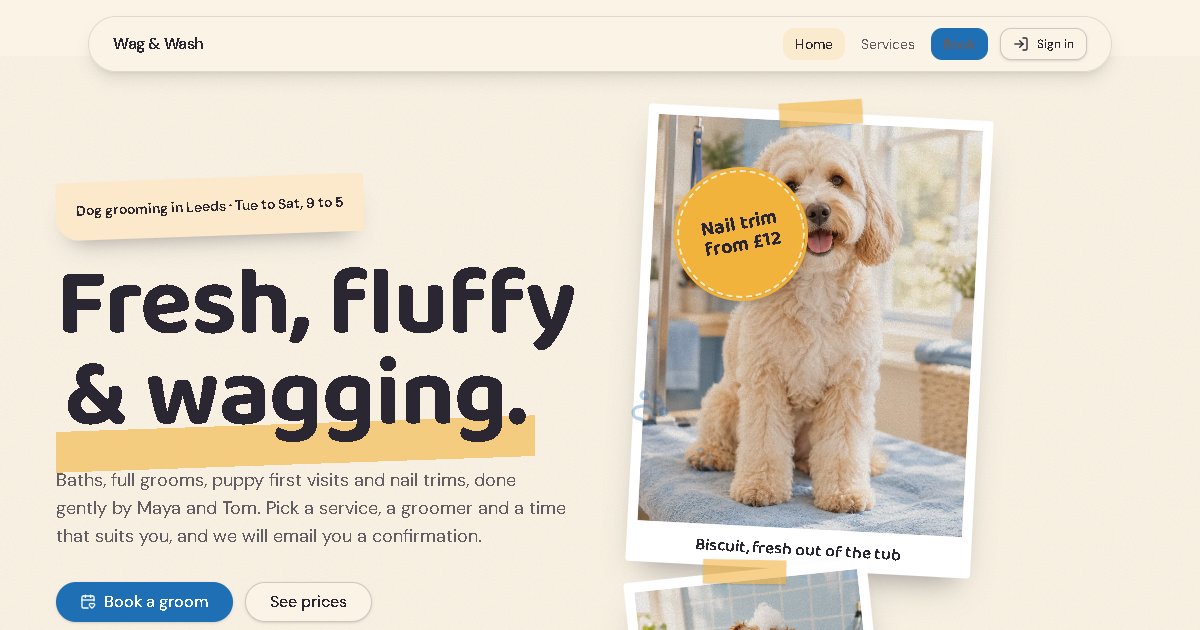
Wag & Wash is an example business we built to show what TypeAnApp can do. Visit the live site.
Ask any groomer what eats their day and they will tell you: the phone. "Have you got anything Saturday?" "How much for a spaniel?" So for our third showcase build we asked TypeAnApp for the thing that answers those calls for you: a booking site that only offers the times that are really free.
Facts at a glance
- Time to build
- Under 9 minutes
- Build credits
- 27.9
- Messages sent
- 2
- Pages
- Home, services, book, diary
- Booking
- 4 steps, free times only
- Paid
- At the salon, after the groom
What did we ask for?
What we typed
A booking website for Wag & Wash, a dog-grooming salon. Services by dog size with prices and how long they take (bath and brush, full groom, puppy introduction, nail trim). Customers pick a service, a groomer and a free time slot, give their dog's name, breed and any notes, and get a confirmation email. Our two groomers work Tuesday to Saturday, 9 to 5. I see the bookings by day and can mark each one as done or no-show.
What does the site look like?
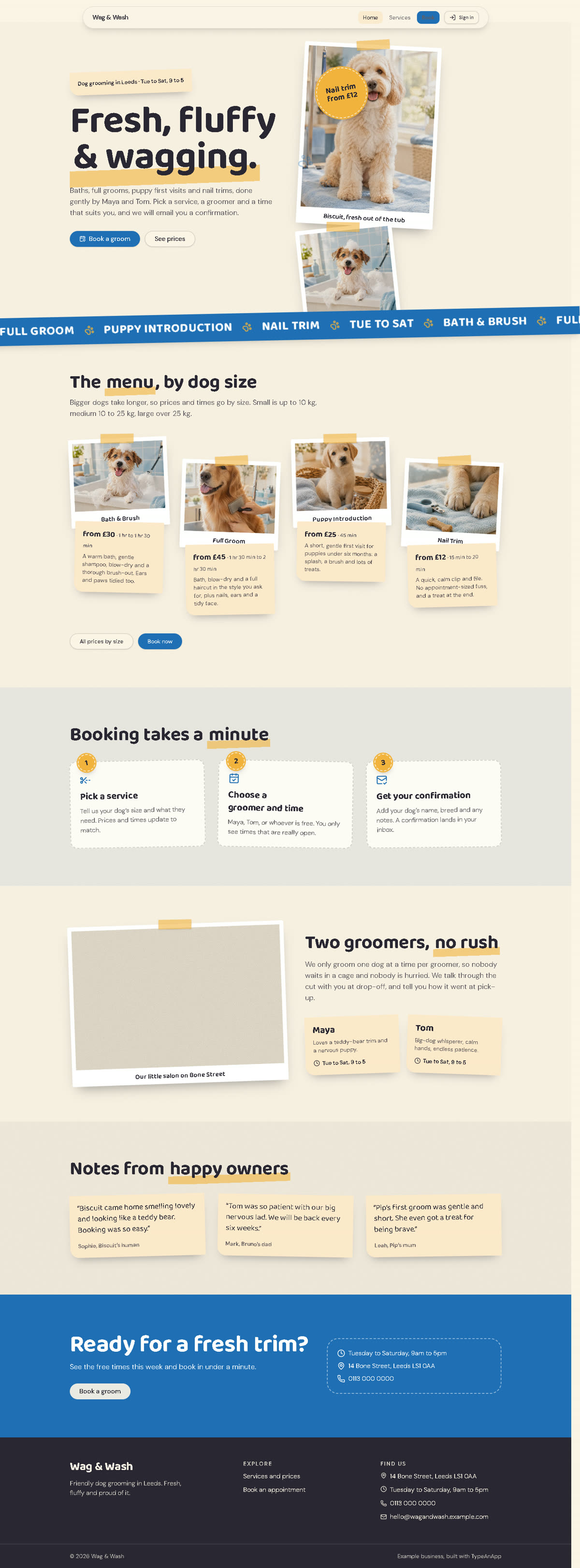
We gave no design instructions at all. The builder picked a scrapbook style for a friendly local groomer: cream paper, bubble blue and sunny yellow, photos taped on like polaroids, sticky notes, round price stickers and a scrolling strip of services. It made six pictures for the site as it built, including Biscuit the cockapoo "fresh out of the tub".
How does the booking work?
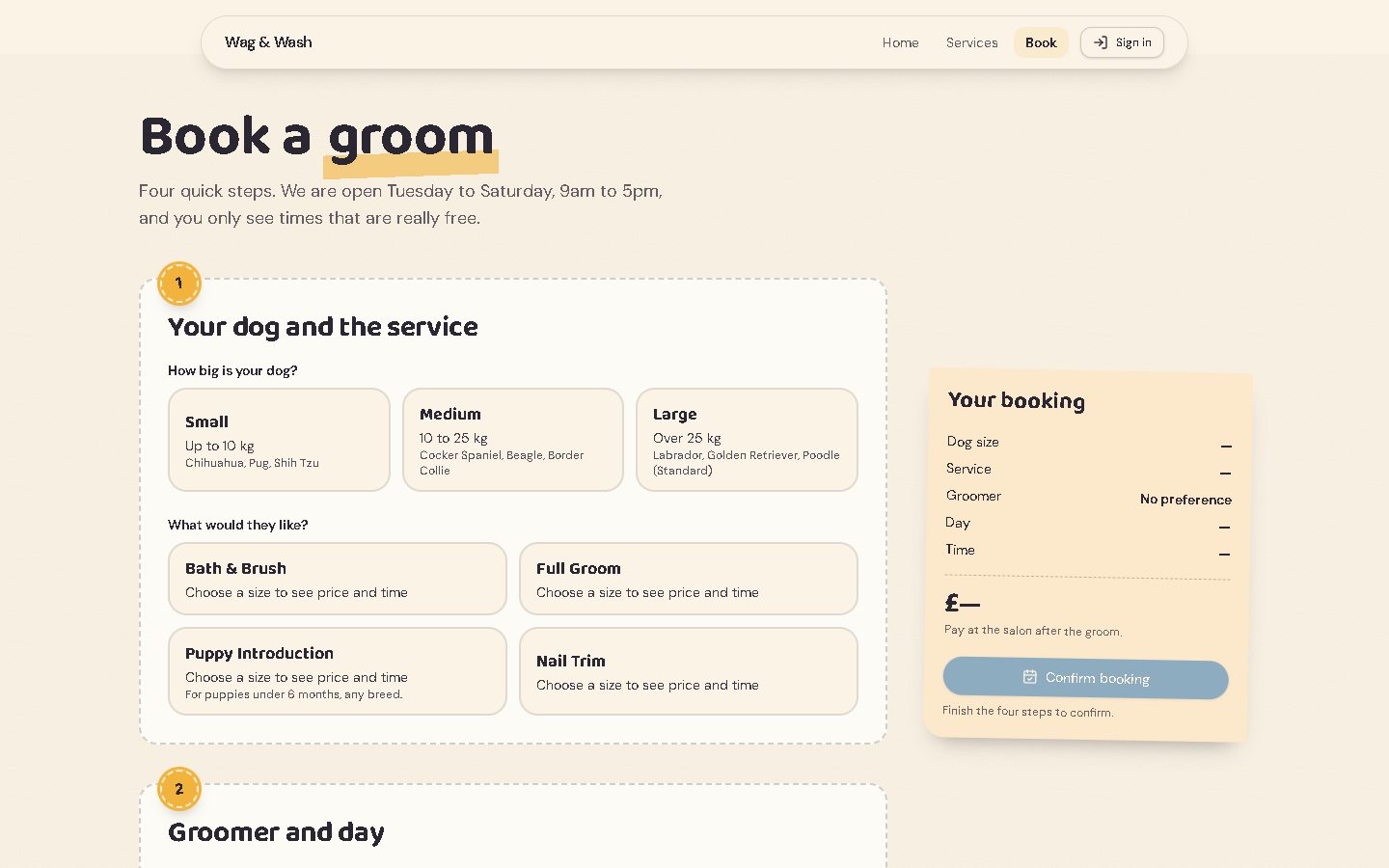
Booking is four steps on one page, with a running summary on the right: the dog's size and the service, the groomer (or "no preference") and the day, a free time, then the dog's name, breed, notes and the owner's contact details. Prices and lengths change with the size of dog, because a Labrador takes longer than a Pug.
The clever part is how it hides taken times without exposing anybody's booking. The builder made a separate public list of taken times that holds only the groomer, the day, the start time and the length: no names, no phone numbers, no dogs. The booking page reads that list to grey out busy slots, and checks again just before saving. With "no preference" it gives the appointment to whichever groomer has fewer dogs that day.
The owner gets a diary page, which only admins can open, showing the day's bookings with buttons to mark each one done, a no-show or cancelled. Cancelling frees the slot again.
Why did it stop and ask permission?
When we pressed Launch, TypeAnApp did not launch. It said one access change was waiting for the owner: bookings would go from "admins only" to "anyone, even without signing in". That is exactly what a booking site needs, but it also means strangers can add records to your database, so TypeAnApp will not do it on the AI's say-so. The owner has to read the change and approve it in the builder.
Customers can create a booking, but only the owner can read, change or delete bookings. The taken-times list can be read and added to by anyone, and only changed by the owner.
What went wrong first time?
The first build (6 minutes 40 seconds, 20.6 credits) wrote two small server steps (backend functions) to check free times and save bookings. Backend functions are not switched on on TypeAnApp's live servers yet, so the app check could not package them, and online booking would not have worked. The builder noticed it was not its code, said so and stopped rather than pretend.
We sent one message explaining that functions were not available and asking it to use tables and access rules instead. Under two minutes and 7.3 credits later, booking worked without them and the app check passed. We have since taught the builder to know this up front.
It also moved the confirmation email: a page can only email the person signed in, and customers book without signing in, so the confirmation became a workflow that emails the address on each new booking once the site is live. Each email uses 4 AI & email credits.
The limits it told us about
- Two people confirming the very same slot at the very same moment could both get it. The page re-checks just before saving, and the diary would show the overlap.
- The price is worked out in the browser, so someone technical could change what the booking says. Customers pay at the salon, so the real price is the one at the till.
- Someone could add fake taken times to block a day. A busy real salon would want a stricter setup.
We would rather a builder told us this than hid it. For a small salon that takes payment in person, these are reasonable trade-offs.
Is it set up for search?
Every TypeAnApp site launches with its own page titles, descriptions, social-share tags, robots.txt and sitemap, and the public pages (home, services, book) are the ones a local search would find. A real salon would add its real address and opening hours, which local search relies on.
What would a real groomer change?
- Approve the bookings access change and launch.
- Swap in the real address, phone, prices, groomers and photos (and replace the sample quotes with real reviews).
- Add a reminder workflow the day before each appointment, which also cuts no-shows.
- Send each new booking to the owner's phone through Telegram or Slack from Dashboard → Integrations.
Frequently asked questions
Can I build a booking website for my salon with AI?
Yes. From one paragraph TypeAnApp built a services page, four-step booking that only shows free times, a confirmation email and an owner's diary. It took two messages and under nine minutes.
How does it stop double bookings?
The booking page reads a list of taken times and re-checks just before saving. Two bookings made at exactly the same moment could still clash, and the owner's diary would show it.
Why did the site need approval before launching?
Letting people book without an account means letting strangers add records. TypeAnApp never widens access on the AI's say-so: the owner has to approve the change in the builder.
Does it take payments?
This example takes payment at the salon. TypeAnApp can also take card payments through Stripe on paid plans.
Is Wag & Wash a real salon?
No. It is an example business made for this case study. The groomers, quotes and contact details are invented.
Matthew, Developer: Matthew builds TypeAnApp, the AI app builder that turns a plain-words idea into a working website or app. He writes up every showcase build here: what we asked for, what came back, and what we changed.